# @soleil-se/config-mediaflow-svelte
Configuration components and server API:s for selecting images or videos from Mediaflow.\
Wraps the [File Selector](https://docs.mediaflow.site/file-selector) from Mediaflow.
## Prerequisites
* [API license for Mediaflow](https://www.mediaflow.com/resurser/api).
* [API authentication for Mediaflow](https://docs.mediaflow.site/mediaflow-api/authentication).
* [Local image archives enabled in Sitevision](https://help.sitevision.se/siteFileSettingsHelp.html).
## Install
```sh
npm i @soleil-se/config-mediaflow-svelte
```
## Getting started
1. Setup global configuration for authentication and image management
A global configuration is needed in the app to set up the Mediaflow authentication and image management.\
This is done by importing the `MediaflowAuth` and `MediaflowImageManagement` panel components from `@soleil-se/config-mediaflow-svelte` in the app, these components has the needed configuration fields.
**./config\_global/App.svelte**
```svelte
```
Here you need to fill in the needed fields for the Mediaflow API:
* **API URL** - The domain for the Mediaflow API.
* **Refresh Token** - The refresh token.
* **Client ID** - The client ID.
* **Client Secret** - The client secret.
There is also support for using a service account, but this is not recommended.
[Service accounts in Mediaflow](https://help.mediaflow.com/hc/en-gb/articles/26150708400669-Manage-users).
* **Username** - The username for the service account.
* **Password** - The password for the service account.
[Read more about the MediaflowAuth component](#mediaflowauth)
And how images will be handled in the module:
* **Hide images not approved according to GDPR** - If images not approved according to GDPR should be hidden.
* **Hide images without GDPR information** - If images without GDPR information should be hidden.
* **Fallback to description for alt text if no alt text is provided** - If the image description should be used as alt text if no alt text is provided, this is useful if having an older Mediaflow instance where alt text wasn’t used but descriptions were.
* **Save usage in Mediaflow** - If the usage of images should be saved in Mediaflow.
* **Folder** - Specify a global folder where images should be saved in the image repository if the module is used on templates and decorations. If you have permission-controlled templates or use the module in decorations, you need to specify a folder to avoid a new image being created in each page’s local image repository.
* **Also save page images in the folder** - If page images should be saved to the global folder as well.
[Read more about the MediaflowImageManagement component](#mediaflowimagemanagement)
2. Pass authentication and config to selector
Call `getMediaflowSelectorProps` and pass the result to the configuration by setting the `mediaflow` prop which is used by the `MediaflowSelector` component.\
This function will read the global configuration and call the Mediaflow API to get the needed authentication.\
It’s not needed to pass this prop to the Mediaflow components since they will be read from the global VALUES object, so the namning is important.
**./config/index.js**
```js
import router from '@sitevision/api/common/router';
import { createAppProps } from '@soleil-se/config-svelte/server';
import { getMediaflowSelectorProps } from '@soleil-se/config-mediaflow-svelte/server';
router.get('/', (req, res) => {
const props = {
mediaflow: getMediaflowSelectorProps(),
};
res.send(createAppProps(props));
});
```
[Read more about the getMediaflowAuth function](#getmediaflowauth)
3. Use the MediaflowPanel or MediaflowSelector component
Use one of the components in the app to select an image from Mediaflow. Depending on the use case either `MediaflowPanel` or `MediaflowSelector` is used.
**./config/App.svelte**
```svelte
```
[Read more about the MediaflowPanel component](#mediaflowpanel)
**./config/App.svelte**
```svelte
```
**./config/App.svelte**
```svelte
```
[Read more about the MediaflowSelector component](#mediaflowselector)
4. Get the image or video
Use `getMediaflowImage` to get the image src and alt-text from the selected image.\
This function will also save the image to the pages local image repository.
* Svelte 5
**./src/index.js**
```js
import router from '@sitevision/api/common/router';
import { render } from '@soleil-se/app-util/server/svelte/5';
import { getMediaflowImage } from '@soleil-se/config-mediaflow-svelte/server';
import App from './App.svelte';
router.get('/', (req, res) => {
const props = {
image: getMediaflowImage('image'),
};
const html = render(App, props);
res.send(html); // res.agnosticRender(html, props);
});
```
Then use the image in your app:
**./src/App.svelte**
```svelte
 ```
Use `getMediaflowVideo` to get the embed code and poster from the selected video.
**./src/index.js**
```js
import router from '@sitevision/api/common/router';
import { render } from '@soleil-se/app-util/server/svelte/5';
import { getMediaflowVideo } from '@soleil-se/config-mediaflow-svelte/server';
router.get('/', (req, res) => {
const props = {
video: getMediaflowVideo('video'),
};
const html = render(App, props);
res.send(html); // res.agnosticRender(html, props);
});
```
Then use the video in your app:
**./src/App.svelte**
```svelte
{@html video.embed}
```
* Svelte 4
**./src/index.js**
```js
import router from '@sitevision/api/common/router';
import { render } from '@soleil-se/app-util/server/svelte/4';
import { getMediaflowImage } from '@soleil-se/config-mediaflow-svelte/server';
import App from './App.svelte';
router.get('/', (req, res) => {
const props = {
image: getMediaflowImage('image'),
};
const html = render(App, props);
res.send(html); // res.agnosticRender(html, props);
});
```
Then use the image in your app:
**./src/App.svelte**
```svelte
```
Use `getMediaflowVideo` to get the embed code and poster from the selected video.
**./src/index.js**
```js
import router from '@sitevision/api/common/router';
import { render } from '@soleil-se/app-util/server/svelte/4';
import { getMediaflowVideo } from '@soleil-se/config-mediaflow-svelte/server';
router.get('/', (req, res) => {
const props = {
video: getMediaflowVideo('video'),
};
const html = render(App, props);
res.send(html);
});
```
Then use the video in your app:
**./src/App.svelte**
```svelte
{@html video.embed}
```
[Read more about the getMediaflowVideo function](#getmediaflowvideo)
## Components
### MediaflowAuth
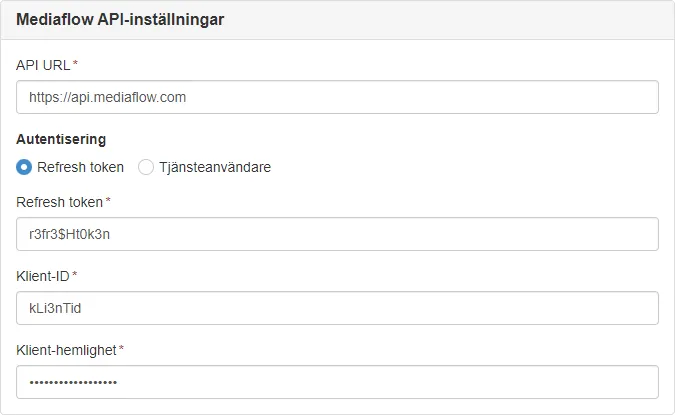
A component that contains the fields needed for authentication for the Mediaflow API.
#### Settings
* **API URL** - The domain for the Mediaflow API.
* **Refresh Token** - The refresh token.
* **Client ID** - The client ID.
* **Client Secret** - The client secret.
There is also support for using a service account, but this is not recommended.
* **Username** - The username for the service account.
* **Password** - The password for the service account.
#### Usage
```svelte
```
##### Props
| Name | Description | Default |
| --------- | ----------------- | --------------------------------------------------------- |
| `heading` | The panel heading | `Mediaflow API-inställningar` \| `Mediaflow API settings` |
##### Data
The following fields are needed for the authentication and are stored in the global configuration:
| Name | Description |
| ------------------ | ------------------------------------- |
| `mfp_apiUrl` | The domain for the Mediaflow API. |
| `mfp_refreshToken` | The refresh token. |
| `mfp_password` | The password for the service account. |
| `mfp_username` | The username for the service account. |
| `mfp_clientId` | The client ID. |
| `mfp_clientSecret` | The client secret. |
### MediaflowImageManagement
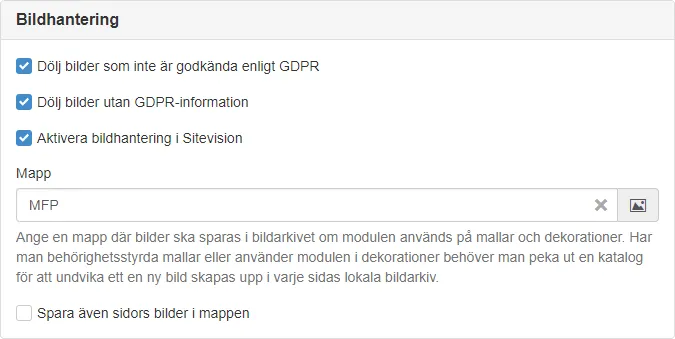
A component that contains the fields needed for configuring the image management for the module.
#### Settings
* **Hide images not approved according to GDPR** - If images not approved according to GDPR should be hidden.
* **Hide images without GDPR information** - If images without GDPR information should be hidden.
* **Enable image management in Sitevision** - If images should be saved in Sitevision, if not set the external Mediaflow URL will be used.
* **Folder** - Specify a global folder where images should be saved in the image repository if the module is used on templates and decorations. If you have permission-controlled templates or use the module in decorations, you need to specify a folder to avoid a new image being created in each page’s local image repository.
* **Also save page images in the folder** - If page images should be saved to the global folder as well.
#### Usage
```svelte
```
##### Props
| Name | Description | Default |
| --------- | ----------------- | ------------------------------------- |
| `heading` | The panel heading | `Bildhantering` \| `Image management` |
### MediaflowPanel
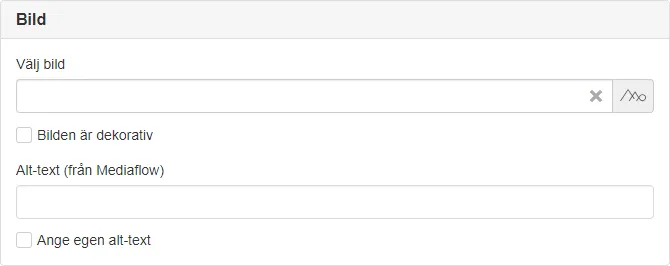
A panel component wrapping a `` and adding functionality for selecting an image and handling alt-text.\
Useful for selecting an image that is used as a part of the content.
Alt-text is fetched automatically from Mediaflow and can be edited in the panel if needed.
> **Panels in panels**
>
> Do not place a panel inside another panel, this will look out of place in the Sitevision UI.
#### Usage
```svelte
```
#### Props
| Name | Description | Default |
| :--------------- | :----------------------------------------------------------------------------------------------------------- | :--------------------------- |
| `name` | The key used when saving the configuration. | Required |
| `value` | The selected image. | `{id: '', url: '', alt: ''}` |
| `heading` | The heading for the panel. | `Bild` \| `Image` |
| `required` | If the fields are required. | `false` |
| `decorative` | If the decorative checkbox should be checked per default. | `false` |
| `hideDecorative` | If the decorative checkbox should be hidden. | `false` |
| `show` | Show and hide component without re-rendering. | `true` |
| `config` | The configuration object for the File Selector, [see available configuration](#file-selector-configuration). | `{}` |
> **Image cropping**
>
> Use the [download formats config](#download-formats) to set the crop formats needed for the module, the ones in Mediaflow will be used by default and might not be optimal for this use case.
#### Events
| Name | Description |
| :------- | :------------------------------------------------------------------------------------------------------------------ |
| `change` | Emitted when an image is selected. The selected image is passed as an object with the fields `id`, `url` and `alt`. |
```svelte
```
#### Slot
Default slot in panel.
```svelte
```
#### Data
| Name | Description |
| :--------------- | :--------------------------------------- |
| `{name}_mfp_id` | The ID of the selected image. |
| `{name}_mfp_url` | The permanent URL to the selected image. |
| `{name}_mfp_alt` | The alt text for the selected image. |
### MediaflowSelector
A component that opens the File Selector to select an image from Mediaflow.\
Useful for selecting a single image for decorative purposes as the alt-text handling isn’t optimal.

#### Usage
```svelte
```
Select a video by setting `type` to `video`.
```svelte
```
##### Props
| Name | Description | Default |
| :----------- | :---------------------------------------------------------------------------------------------------------- | :--------------------------- |
| `name` | The key used when saving the configuration. | Required |
| `label` | The label for the input field. | Required |
| `value` | The selected image. | `{id: '', url: '', alt: ''}` |
| `decorative` | If the image is decorative. | `false` |
| `required` | If the field is required. | `false` |
| `show` | Show and hide component without re-rendering. | `true` |
| `type` | If an image or video should be selected. | `image` |
| `config` | The configuration object for the File Selector, [see available configuration](#file-selector-configuration) | `{}` |
> **Image cropping**
>
> Use the [download formats config](#download-formats) to set the crop formats needed for the module, the ones in Mediaflow will be used by default and might not be optimal for this use case.
#### Events
| Name | Description |
| :------- | :------------------------------------------------------------------------------------------------------------------------------------------------------------------------------ |
| `change` | Emitted when an image or video is selected. The selected media is passed as an object with the fields `id`, `url` (image), `alt` (image), `embed` (video) and `poster` (video). |
```svelte
```
#### Slot
Default slot after field.
```svelte
```
Use `getMediaflowVideo` to get the embed code and poster from the selected video.
**./src/index.js**
```js
import router from '@sitevision/api/common/router';
import { render } from '@soleil-se/app-util/server/svelte/5';
import { getMediaflowVideo } from '@soleil-se/config-mediaflow-svelte/server';
router.get('/', (req, res) => {
const props = {
video: getMediaflowVideo('video'),
};
const html = render(App, props);
res.send(html); // res.agnosticRender(html, props);
});
```
Then use the video in your app:
**./src/App.svelte**
```svelte
{@html video.embed}
```
* Svelte 4
**./src/index.js**
```js
import router from '@sitevision/api/common/router';
import { render } from '@soleil-se/app-util/server/svelte/4';
import { getMediaflowImage } from '@soleil-se/config-mediaflow-svelte/server';
import App from './App.svelte';
router.get('/', (req, res) => {
const props = {
image: getMediaflowImage('image'),
};
const html = render(App, props);
res.send(html); // res.agnosticRender(html, props);
});
```
Then use the image in your app:
**./src/App.svelte**
```svelte
```
Use `getMediaflowVideo` to get the embed code and poster from the selected video.
**./src/index.js**
```js
import router from '@sitevision/api/common/router';
import { render } from '@soleil-se/app-util/server/svelte/4';
import { getMediaflowVideo } from '@soleil-se/config-mediaflow-svelte/server';
router.get('/', (req, res) => {
const props = {
video: getMediaflowVideo('video'),
};
const html = render(App, props);
res.send(html);
});
```
Then use the video in your app:
**./src/App.svelte**
```svelte
{@html video.embed}
```
[Read more about the getMediaflowVideo function](#getmediaflowvideo)
## Components
### MediaflowAuth
A component that contains the fields needed for authentication for the Mediaflow API.

#### Settings
* **API URL** - The domain for the Mediaflow API.
* **Refresh Token** - The refresh token.
* **Client ID** - The client ID.
* **Client Secret** - The client secret.
There is also support for using a service account, but this is not recommended.
* **Username** - The username for the service account.
* **Password** - The password for the service account.
#### Usage
```svelte
```
##### Props
| Name | Description | Default |
| --------- | ----------------- | --------------------------------------------------------- |
| `heading` | The panel heading | `Mediaflow API-inställningar` \| `Mediaflow API settings` |
##### Data
The following fields are needed for the authentication and are stored in the global configuration:
| Name | Description |
| ------------------ | ------------------------------------- |
| `mfp_apiUrl` | The domain for the Mediaflow API. |
| `mfp_refreshToken` | The refresh token. |
| `mfp_password` | The password for the service account. |
| `mfp_username` | The username for the service account. |
| `mfp_clientId` | The client ID. |
| `mfp_clientSecret` | The client secret. |
### MediaflowImageManagement
A component that contains the fields needed for configuring the image management for the module.

#### Settings
* **Hide images not approved according to GDPR** - If images not approved according to GDPR should be hidden.
* **Hide images without GDPR information** - If images without GDPR information should be hidden.
* **Enable image management in Sitevision** - If images should be saved in Sitevision, if not set the external Mediaflow URL will be used.
* **Folder** - Specify a global folder where images should be saved in the image repository if the module is used on templates and decorations. If you have permission-controlled templates or use the module in decorations, you need to specify a folder to avoid a new image being created in each page’s local image repository.
* **Also save page images in the folder** - If page images should be saved to the global folder as well.
#### Usage
```svelte
```
##### Props
| Name | Description | Default |
| --------- | ----------------- | ------------------------------------- |
| `heading` | The panel heading | `Bildhantering` \| `Image management` |
### MediaflowPanel
A panel component wrapping a `` and adding functionality for selecting an image and handling alt-text.\
Useful for selecting an image that is used as a part of the content.
Alt-text is fetched automatically from Mediaflow and can be edited in the panel if needed.

> **Panels in panels**
>
> Do not place a panel inside another panel, this will look out of place in the Sitevision UI.
#### Usage
```svelte
```
#### Props
| Name | Description | Default |
| :--------------- | :----------------------------------------------------------------------------------------------------------- | :--------------------------- |
| `name` | The key used when saving the configuration. | Required |
| `value` | The selected image. | `{id: '', url: '', alt: ''}` |
| `heading` | The heading for the panel. | `Bild` \| `Image` |
| `required` | If the fields are required. | `false` |
| `decorative` | If the decorative checkbox should be checked per default. | `false` |
| `hideDecorative` | If the decorative checkbox should be hidden. | `false` |
| `show` | Show and hide component without re-rendering. | `true` |
| `config` | The configuration object for the File Selector, [see available configuration](#file-selector-configuration). | `{}` |
> **Image cropping**
>
> Use the [download formats config](#download-formats) to set the crop formats needed for the module, the ones in Mediaflow will be used by default and might not be optimal for this use case.
#### Events
| Name | Description |
| :------- | :------------------------------------------------------------------------------------------------------------------ |
| `change` | Emitted when an image is selected. The selected image is passed as an object with the fields `id`, `url` and `alt`. |
```svelte
```
#### Slot
Default slot in panel.
```svelte
```
#### Data
| Name | Description |
| :--------------- | :--------------------------------------- |
| `{name}_mfp_id` | The ID of the selected image. |
| `{name}_mfp_url` | The permanent URL to the selected image. |
| `{name}_mfp_alt` | The alt text for the selected image. |
### MediaflowSelector
A component that opens the File Selector to select an image from Mediaflow.\
Useful for selecting a single image for decorative purposes as the alt-text handling isn’t optimal.

#### Usage
```svelte
```
Select a video by setting `type` to `video`.
```svelte
```
##### Props
| Name | Description | Default |
| :----------- | :---------------------------------------------------------------------------------------------------------- | :--------------------------- |
| `name` | The key used when saving the configuration. | Required |
| `label` | The label for the input field. | Required |
| `value` | The selected image. | `{id: '', url: '', alt: ''}` |
| `decorative` | If the image is decorative. | `false` |
| `required` | If the field is required. | `false` |
| `show` | Show and hide component without re-rendering. | `true` |
| `type` | If an image or video should be selected. | `image` |
| `config` | The configuration object for the File Selector, [see available configuration](#file-selector-configuration) | `{}` |
> **Image cropping**
>
> Use the [download formats config](#download-formats) to set the crop formats needed for the module, the ones in Mediaflow will be used by default and might not be optimal for this use case.
#### Events
| Name | Description |
| :------- | :------------------------------------------------------------------------------------------------------------------------------------------------------------------------------ |
| `change` | Emitted when an image or video is selected. The selected media is passed as an object with the fields `id`, `url` (image), `alt` (image), `embed` (video) and `poster` (video). |
```svelte
```
#### Slot
Default slot after field.
```svelte
Some helpful text
```
#### Data
| Name | Description |
| :----------------------- | :--------------------------------------- |
| `{name}_mfp_id` | The ID of the selected image. |
| `{name}_mfp_url` | The permanent URL to the selected image. |
| `{name}_mfp_alt` | The alt text for the selected image. |
| `{name}_mfp_description` | The description of the selected image. |
| `{name}_mfp_embed` | The embed code for the selected video. |
| `{name}_mfp_poster` | The poster image for the selected video. |
## Server API
### getMediaflowSelectorProps
Call `getMediaflowSelectorProps` and pass the result to the configuration by setting the `mediaflow` prop which is used by the `MediaflowSelector` component.\
This function will read the global configuration and call the Mediaflow API to get the needed authentication.
**./config/index.js**
```js
import router from '@sitevision/api/common/router';
import { createAppProps } from '@soleil-se/config-svelte/server';
import { getMediaflowSelectorProps } from '@soleil-se/config-mediaflow-svelte/server';
router.get('/', (req, res) => {
const props = {
mediaflow: getMediaflowSelectorProps(),
};
res.send(createAppProps(props));
});
```
### getMediaflowAuth
Get the authentication for the Mediaflow API, uses the fields set in the global configuration with `MediaflowAuth` by default.
**Returns**: `Object` - Auth object.
```js
{
access_token: 'token'
client_id: 'clientId'
client_secret: 'clientSecret'
expires_in: 7200
refresh_token: 'refreshToken'
token_type: 'Bearer'
}
```
| Param | Type | Description |
| -------------------- | -------- | -------------------------------------------- |
| \[options] | `Object` | Optional options if not using default values |
| options.apiUrl | `string` | Mediaflow API URL. |
| options.refreshToken | `string` | Mediaflow refresh token (Recommended). |
| options.username | `string` | Mediaflow service account username. |
| options.password | `string` | Mediaflow service account password. |
| options.clientId | `string` | Mediaflow client ID. |
| options.clientSecret | `string` | Mediaflow client secret. |
Default values from global configuration:
```js
{
apiUrl = globalAppData.get('mfp_apiUrl'),
refreshToken = globalAppData.get('mfp_refreshToken'),
username = globalAppData.get('mfp_username'),
password = globalAppData.get('mfp_password'),
clientId = globalAppData.get('mfp_clientId'),
clientSecret = globalAppData.get('mfp_clientSecret'),
}
```
Get the authentication object:
```js
import { getMediaflowAuth } from '@soleil-se/config-mediaflow-svelte/server';
const auth = getMediaflowAuth();
```
Get the authentication object with other options:
```js
import { getMediaflowAuth } from '@soleil-se/config-mediaflow-svelte/server';
const auth = getMediaflowAuth({
apiUrl: 'https://api.mediaflow.com',
refreshToken: 'refreshToken', // Recommended
username: 'serviceAccount',
password: 'password',
clientId: 'clientId',
clientSecret: 'clientSecret',
});
```
Most often used to send authentication to the configuration:
**./config/index.js**
```js
import router from '@sitevision/api/common/router';
import { createAppProps } from '@soleil-se/config-svelte/server';
import { getMediaflowAuth } from '@soleil-se/config-mediaflow-svelte/server';
router.get('/', (req, res) => {
const props = {
mediaflowAuth: getMediaflowAuth(),
};
res.send(createAppProps(props));
});
```
### getMediaflowImage
Get the Mediaflow image object.
> **Local image archive**
>
> When getting an image it is saved to the local image archive as a `sv:image` node. This is done when the module is viewed in the Sitevision Editor and if the user has write permission. Otherwise the permanent link to the image in Mediaflow will be used.
**Returns**: `Object` - The Mediaflow image with src, alt and description fields, `undefined` if no image is set.
```js
{
src: '/images/18.750574b718fe4918f31666/17199881188/mfp_12_750574b718fe4918f31607.jpg',
alt: 'A cute kitten playing with a ball'
description: 'A cute kitten playing with a ball of yarn on a wooden floor.'
}
```
| Param | Type | Description |
| ----- | -------- | ----------------------------------------- |
| key | `string` | The key where the configuration is saved. |
**./src/index.js**
```js
import { getMediaflowImage } from '@soleil-se/config-mediaflow-svelte/server';
const image = getMediaflowImage('image');
// { src: '...', alt: '...', description: '...' }
```
### getMediaflowImageNode
Get the Mediaflow image node, a `sv:image` saved in the local image archive.\
Useful when you need to use Sitevision to handle the image scaling.
**Returns**: `Node` - The image node, `sv:image` in the local image archive.
| Param | Type | Description |
| ----- | -------- | ----------------------------------------- |
| key | `string` | The key where the configuration is saved. |
**./src/index.js**
```js
import { getMediaflowImageNode } from '@soleil-se/config-mediaflow-svelte/server';
const imageNode = getMediaflowImageNode('image');
```
### getMediaflowImageSrc
Get the src of the save Mediaflow image.
**Returns**: `string` - The src of the image, undefined if no image is set.
| Param | Type | Description |
| ----- | -------- | ----------------------------------------- |
| key | `string` | The key where the configuration is saved. |
### getMediaflowImageAltText
Get the alt text of the saved Mediaflow image.
**Returns**: `string` - The alt text of the Mediaflow image.
| Param | Type | Description |
| ----- | -------- | ----------------------------------------- |
| key | `string` | The key where the configuration is saved. |
### getMediaflowVideo
Get the Mediaflow video object.
**Returns**: `Object` - The Mediaflow image with embed and poster fields, `undefined` if no video is set.
```js
{
embed: 'html code',
poster: 'https://mediaflow.com/image.jpg'
}
```
| Param | Type | Description |
| ----- | -------- | ----------------------------------------- |
| key | `string` | The key where the configuration is saved. |
**./src/index.js**
```js
import { getMediaflowVideo } from '@soleil-se/config-mediaflow-svelte/server';
const video = getMediaflowVideo('video');
// { embed: '...', poster: '...' }
```
## File Selector configuration
See all available configuration options in the [File Selector documentation](https://docs.mediaflow.site/file-selector/options).
| Field | Description | Default |
| ------------------------ | ---------------------------------------------------------------------------------------------------------------------------- | ------------------- |
| `limitFileType` | Comma-separated list of allowed file extensions. All files that do not match this are filtered out | `jpg,jpeg,png,webp` |
| `allowSelectFormat` | If the user is allowed to select the crop format from a list. Otherwise you must specify a crop format with downloadFormats. | `true` |
| `downloadFormat` | How to handle crop formats. See [download formats](#download-formats) | `mediaflow` |
| `downloadFormats` | List of crop formats to choose from. See [download formats](#download-formats) | `[]` |
| `aiAltTextDisabled` | Set to true to explicitly disable AI alt text option | `false` |
| `aiAltTextLanguageCode` | Lock alt text to a specific language. If not set, a dropdown list with languages will be displayed | `undefined` |
| `aiSearchDisabled` | Set to true to explicitly disable AI search option | `false` |
| `autosetDescription` | Determines whether the image description should populate the field | `false` |
| `excludePrivateFolders` | Set to true to not include private folders (such as “My files”) in folder tree | `false` |
| `ignorePermissionChecks` | Set to true to ignore permission warnings and disabling of download | `false` |
| `setDescription` | Determines whether the field for image description should be displayed | `false` |
### Download formats
Possible values for `downloadFormat`:
| Value | Description |
| ----------- | ------------------------------------------------------------------------------------------ |
| `fixed` | Use only those specified in `downloadFormats`. |
| `mediaflow` | Use the crop formats specified in Mediaflow. |
| `both` | Use the crop formats specified in Mediaflow and add those included in `downloadFormats`. |
| `original` | Always use the original format, can be used when Sitevision is handling the image scaling. |
| `stream` | Applies to media files. Save a stream URL instead of a downloadable URL. |
`downloadFormats` is an array of objects with the following fields:
| Field | Description |
| -------- | ----------------------------------- |
| `name` | The name of the format. |
| `width` | The width of the format in pixels. |
| `height` | The height of the format in pixels. |
### Example configuration
```js
{
limitFileType: 'jpg,jpeg,png,webp',
allowSelectFormat: true,
downloadFormat: 'fixed',
downloadFormats: [
{ name: '16:10', width: 1280, height: 800 },
{ name: '16:9', width: 1280, height: 720 },
{ name: '4:3', width: 800, height: 600 },
{ name: '1:1', width: 800, height: 800}
],
}
```
### The defaults object
Allows you to define default crop settings when initializing the File Selector—an alternative to using download presets configured in the Mediaflow app.
| Field | Description |
| ----------------------- | ------------------------------------------------------------------------------------------------------------------------------- |
| `width` | Width in pixels. Must be used together with height and format. |
| `height` | Height in pixels. Must be used together with width and format. |
| `format` | Preselected default format. `-1`: Free crop, `-2`: User format, `-3`: Do not crop. Must be used together with width and height. |
| `imageDownloadFileType` | Allowed formats: `"jpg"`, `"png"`, `"webp"`. |
Example:
```js
{
// ...other config
defaults: {
width: 100,
height: 100,
format: -1,
imageDownloadFileType: 'webp'
}
}
```
### Video options
Configuration options for video selection and embedding.
| Field | Description | Default |
| ------------------ | ----------------------------------------- | ------- |
| `allowIframeVideo` | Allow embedding of video using an iframe | `true` |
| `allowJSVideo` | Allow embedding of video using JavaScript | `true` |
### Other fields
> **Do not set the following fields**
>
> The following fields are handled by the `MediaflowSelector` component and should **not** be set in the configuration object.
| Field | Description |
| --------------------------- | ------------------------------------------------------------------------------------------------------------------------------------------------------------------------------------------------ |
| `auth` | Is set by the `MediaflowAuth` component and passed as a prop to the configuration. |
| `client_id` | Is set by the `MediaflowAuth` component and passed as a prop to the configuration. |
| `client_secret` | Is set by the `MediaflowAuth` component and passed as a prop to the configuration. |
| `refresh_token` | Is set by the `MediaflowAuth` component and passed as a prop to the configuration. |
| `locale` | Is set automatically base on the document language. |
| `noCropButton` | The crop view is needed for the image to be saved to the local image repository. |
| `setAltText` | If using the `MediaflowSelector` component this is set based on the `decorative` prop. |
| `forceAltText` | If using the `MediaflowSelector` component this is set based on the `decorative` prop. |
| `autosetAltText` | If using the `MediaflowSelector` component this is set based on the `decorative` prop. |
| `customAltText` | The alt text should be set based on the image content and a generic one will not work. |
| `showDoneButton` | The done button is hidden by default and should not be shown since it’s handled by the `MediaflowSelector` component. |
| `selectedFolder` | The last selected image folder is shown by default and should not be set. |
| `selectedFile` | The last selected image is shown by default and should not be set. |
| `permanentURL` | We need a permanent URL to save the image to the local image repository. |
| `success` | The success callback is handled by the `MediaflowSelector` component. |
| `events` | The events are handled by the `MediaflowSelector` component. |
| `hideUnsafeGDPR` | Filter out files that are not approved according to GDPR. This is set in global settings in the `MediaflowImageManagement` component. |
| `hideUnassignedGDPR` | Also filter out files that do not have any GDPR information set. This is set in global settings in the `MediaflowImageManagement` component. |
| `showDoneButtonWorkingFlow` | Displays a message when clicking “Use this file” showing status while data is being fetched. Used when the File Selector is utilized in an extension where you need to manually close the window |
| `useNavigationLink` | Enable adding a URL to the output data. If used, an input field is added to the “last step” when selecting an image |